When you send or receive an email using MailBig, your message doesn't just jump straight from point A to point B. Behind the scenes, MailBig splits its job into two completely different systems: one built for maximum delivery success when sending mail out, and another built for maximum security when receiving mail in.
1. Outgoing Mail: Powered by MailBaby & a Rotating IP Pool
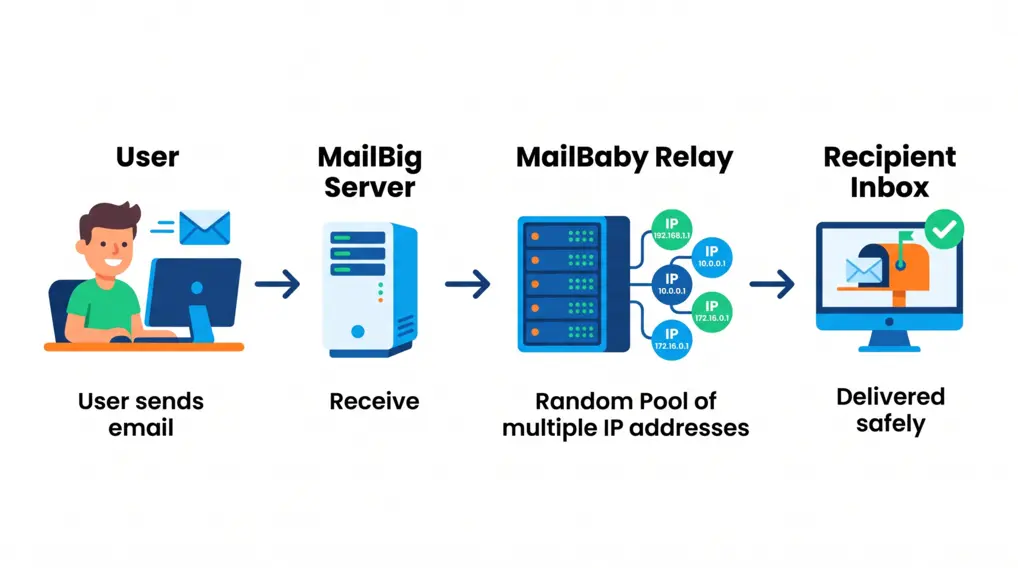
When you click Send, your biggest enemy is the recipient's spam folder. Big email providers like Gmail, Outlook, and Yahoo are very picky about which servers they trust. If a single server sends too many emails at once, or if one user sends bad mail, that server's IP address can get blocked.
To solve this, MailBig hands your outgoing mail over to a specialized delivery network called MailBaby.
How Outgoing Mail Works (Step-by-Step)
-
You Hit Send: Your email leaves your device or webmail and lands on the MailBig server.
-
Hand-off to MailBaby (Smart Host Relay): Instead of trying to deliver the email directly to Gmail or Yahoo itself, MailBig passes it to MailBaby, a high-reputation SMTP relay service. Think of MailBaby as an express courier that already has VIP access to every major inbox.
-
Quick Safety Check: Before MailBaby sends your message out, it checks that your domain permissions (like SPF and DKIM) are valid and confirms the message isn't spam.
-
The Random Multi-IP Pool: MailBaby doesn't send all emails from a single internet address. Instead, it picks an IP address from a large pool of clean, trusted IP addresses. By spreading outgoing traffic randomly across many different IPs:
-
No single IP gets overloaded or rate-limited.
-
If one IP ever runs into a temporary delay, the rest of the pool keeps delivering mail smoothly.
-
Your emails maintain high trust scores and land in the Primary Inbox rather than the Spam folder.
-
2. Incoming Mail: Local Filtering with Rspamd & ClamAV
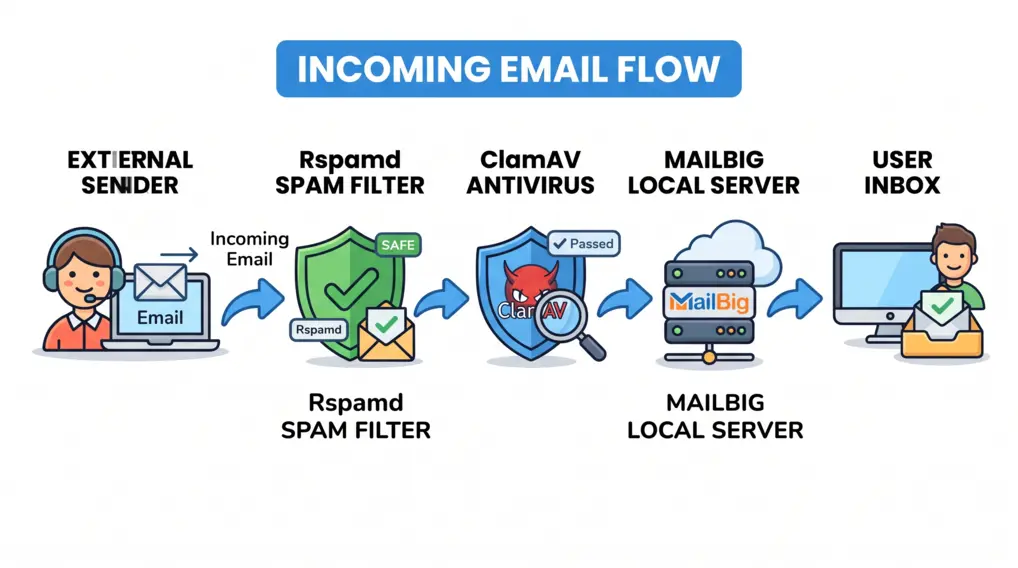 When someone sends an email to you, the goal flips. Now, MailBig doesn't need a third-party relay; it handles incoming mail locally on its own servers. Because the internet is full of junk mail, phishing links, and dangerous attachments, MailBig puts two heavy-duty security guards in front of your inbox.
How Incoming Mail Works (Step-by-Step)
-
Arrival at the Local Server: An external sender's server sent mail directly to MailBig's local mail server
-
Checkpoint 1 - Rspamd (The Spam Detective): Before the email goes any further, Rspamd inspects it in milliseconds. Rspamd is an ultra-fast spam filtering engine that grades every incoming message using hundreds of rules:
-
Is the sender on a known spam blacklist?
-
Does the sender's domain match who they claim to be?
-
Are there suspicious links or urgent phishing tricks in the text?
-
Rspamd adds up a spam score. If the score is too high, the email is rejected or tossed straight into your Junk folder.
-
-
Checkpoint 2 - ClamAV (The Virus Scanner): Next, Rspamd passes the email's attachments to ClamAV, an open-source antivirus engine running locally on the server.
-
ClamAV opens up attachments (like PDFs, ZIP files, and documents) and compares them against a constantly updated database of known viruses, trojans, and malware.
-
If it spots a threat, it blocks and rejects the email immediately so you can never accidentally click an infected file.
-
-
Safe Delivery to Your Inbox: Once the message clears both Rspamd and ClamAV, it is stored locally on MailBig and appears cleanly in your inbox.
By separating these two jobs, outsourcing delivery reputation to MailBaby's rotating IP pool while keeping security scanning local with Rspamd and ClamAV, MailBig gives you reliable email delivery without sacrificing inbox safety or privacy.